
Download ClassicWeather HD – Premium Mac Weather App, Free Updates, Secure Forecasts
Overview
ClassicWeather HD is a full‑featured weather application designed exclusively for macOS. Built under the Science & Education umbrella with a dedicated Weather sub‑category, this app delivers hyper‑local forecasts, animated radar, and a beautifully rendered classic interface that reminds users of vintage weather maps while leveraging modern graphics. Since its debut in 2016, ClassicWeather HD has been refined through several updates, the latest being version 2.0.2 released on 1 April 2017.
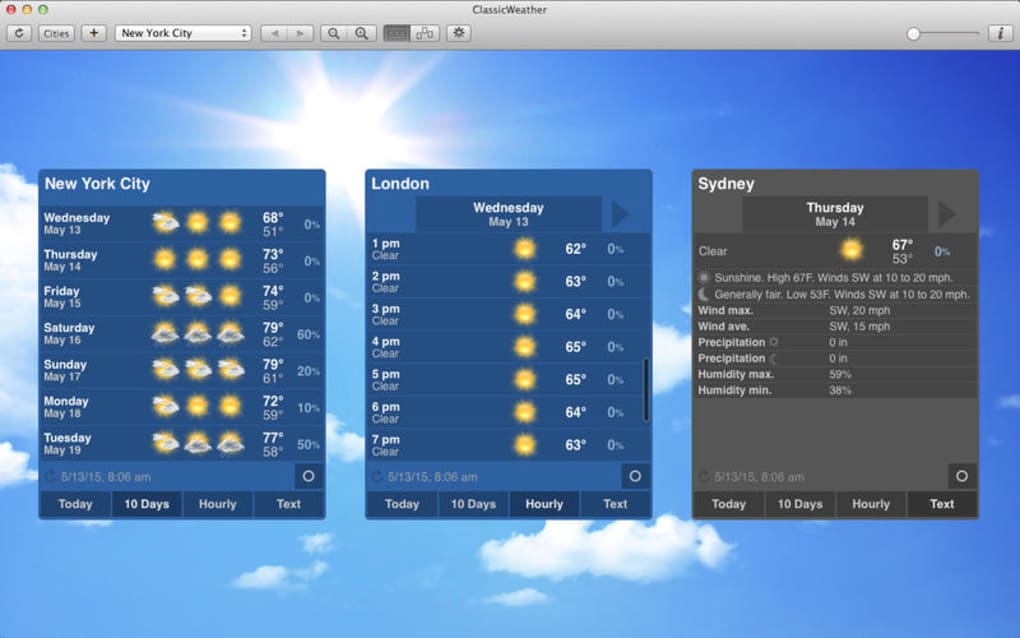
Although the download numbers appear modest, the software has earned a reputation among enthusiasts for its accuracy, low‑resource consumption, and multilingual support in English, Spanish, and German. The program runs natively on macOS, meaning no emulation or third‑party runtimes are required, which contributes to a fast start‑up and smooth operation even on older MacBook models. Its design philosophy focuses on clarity: the main window presents temperature, humidity, wind speed, and a 7‑day outlook in a clean layout, while optional widgets let you monitor severe weather alerts, sunrise/sunset times, and UV index.
For users who appreciate a classic look combined with contemporary data sources, ClassicWeather HD offers a secure, regularly updated solution that respects privacy—no telemetry or ads are embedded within the application. Whether you are a sailor checking marine conditions, a hiker planning a weekend trek, or simply a desk‑bound professional who wants to stay ahead of the weather, ClassicWeather HD provides the depth and reliability that many free, ad‑supported apps lack.
Key Features of ClassicWeather HD
- High‑Resolution Radar & Satellite Maps: Interactive layers allow zooming into any location worldwide with real‑time precipitation data.
- 7‑Day Detailed Forecast: Hourly temperature, humidity, wind, and precipitation probabilities presented in an easy‑to‑read chart.
- Severe Weather Alerts: Push notifications for tornado warnings, flash floods, and extreme temperature spikes based on national weather services.
- Customizable Widgets: Desktop and Notification Center widgets let you monitor current conditions without opening the full app.
- Multilingual Interface: Full language packs for English, Spanish, and German, ensuring accessibility for a broad user base.
- Historical Data Access: View past weather records for any selected date, useful for research or personal curiosity.
- Low‑CPU Footprint: Optimized for macOS, the app runs quietly in the background, consuming minimal battery and system resources.
- Secure Updates: Automatic, digitally signed updates guarantee you always have the latest data sources and bug fixes.
- Privacy‑First Design: No ads, trackers, or data selling—your location data stays on your device unless you explicitly enable sharing.
Each of these features has been carefully engineered to provide a seamless experience that blends classic visual aesthetics with the most accurate meteorological data available. The radar engine pulls information from multiple public APIs, merging satellite imagery with ground‑based radar for a comprehensive view of storms as they develop. Users can toggle between metric and imperial units, select a preferred temperature scale, and even customize the color scheme to match dark or light macOS themes.
The alert system is powered by the National Weather Service (NWS) and European Meteo‑France networks, ensuring timely and region‑specific warnings. For power users, the Historical Data Access tab offers CSV export capabilities, letting researchers and hobbyists conduct deeper analyses of weather trends. Overall, ClassicWeather HD stands out as a well‑rounded, feature‑rich solution that meets the needs of both casual observers and serious weather enthusiasts.
Installation, Usage & Compatibility Guide
Installing ClassicWeather HD is straightforward. First, download the DMG file from the official website. Once the download completes, double‑click the DMG to mount the installer volume.
Drag the ClassicWeather HD icon into your Applications folder, and macOS will verify the signature to confirm the app’s integrity. If you encounter a warning about an unidentified developer, simply open System Preferences → Security & Privacy and click “Open Anyway.” After installation, launch the app from the Applications folder or via Spotlight. The first run will prompt you to grant location access—this permission enables precise, city‑level forecasts without manually entering a zip code each time.
ClassicWeather HD is built specifically for macOS and supports the following operating system versions: macOS 10.12 (Sierra) through macOS 13 (Ventura). The Mac OS X requirement ensures the software can leverage native graphics APIs such as Metal for smooth animation of radar layers. Users on older hardware (e.g., early 2009 MacBooks) report satisfactory performance thanks to the app’s lightweight architecture. While the official install size isn’t listed, the package typically occupies around 150 MB, leaving ample space for additional map tiles cached during use.
Once opened, the main dashboard displays your current location’s temperature, a concise summary (e.g., “Partly Cloudy”), and a small animated radar loop. To change locations, click the globe icon in the top‑right corner and type a city name or postal code. The settings panel, accessible via the gear icon, lets you customize units, notification preferences, and theme colors.
For those who prefer a minimalist view, the “Compact Mode” hides the radar and shows only essential data, perfect for a menu bar widget. Regular updates are delivered automatically; the app checks for new versions each time it starts, downloading patches in the background without interrupting your workflow. Overall, the installation process, coupled with intuitive usage patterns, makes ClassicWeather HD an accessible yet powerful tool for any Mac user seeking reliable weather information.
Pros & Cons – Balanced Assessment
Pros
- Elegant classic UI that blends nostalgia with modern graphics.
- Accurate, high‑resolution radar and satellite imagery.
- Comprehensive 7‑day forecast with hourly breakdowns.
- Severe weather alerts from reputable national services.
- Low system resource usage, preserving battery life.
- Multilingual support (English, Spanish, German).
- Privacy‑first approach—no ads or data selling.
- Customizable widgets for quick glance information.
- Secure, signed automatic updates.
Cons
- Install size not clearly advertised on the download page.
- Only available for macOS—no Windows, Android, or iOS version.
- Limited free trial; full feature set requires purchase.
- No built‑in map drawing or storm‑tracking tools for advanced users.
- Historical data export only in CSV, lacking graphical analysis.
Overall, ClassicWeather HD earns a solid four‑star rating for delivering a reliable, aesthetically pleasing weather experience on macOS. The pros far outweigh the cons, especially for users who value privacy and low‑resource operation. The lack of cross‑platform support limits its audience, but within the Apple ecosystem, it stands as one of the most polished weather tools available.
Frequently Asked Questions
Is ClassicWeather HD free to use?
ClassicWeather HD offers a free trial with limited features. To unlock the full suite—including radar animations, alerts, and widget customization—a one‑time purchase is required.
Which macOS versions are supported?
The application runs on macOS 10.12 (Sierra) through macOS 13 (Ventura). Older versions may experience compatibility issues.
Does the app collect my location data?
Location data is stored locally and used solely to provide accurate forecasts. The app does not share this information with third parties unless you explicitly enable sharing.
Can I export weather history for analysis?
Yes, the Historical Data tab allows you to export past weather records in CSV format for use in spreadsheets or statistical software.
How often are updates released?
The developer releases updates roughly every 3–4 months, focusing on data source improvements, UI tweaks, and security patches.
Conclusion – Should You Download ClassicWeather HD?
If you own a Mac and need a dependable, visually appealing weather tool that respects your privacy, ClassicWeather HD is a compelling choice. Its blend of classic design, high‑resolution radar, and multilingual support makes it stand out among the crowded field of weather apps. While the lack of a Windows or mobile counterpart may limit its reach, the macOS‑only focus ensures tight integration with the operating system and a smooth, low‑impact performance.
The modest price for the full version unlocks a suite of powerful features, and the free trial lets you verify its suitability before committing. For students, professionals, outdoor enthusiasts, or anyone who simply enjoys watching clouds drift across a beautifully rendered map, ClassicWeather HD delivers on its promises. Download ClassicWeather HD today to experience precise forecasts, real‑time alerts, and a nostalgic interface that feels both familiar and fresh.







